
Five-minute tour
This page takes you from nothing to a fixed, verified page in about five minutes. Every command and every output below was run for real on the sample pages in this repository; nothing is mocked. You need Node.js 20 or newer. You do not need an account, an API key or a network connection after the first download.
Step 1. Run the audit#
Point the tool at any folder that contains front-end source (HTML, CSS, JSX, TSX, Vue, Svelte, Astro). It only reads files.
npx rachnasutra audit .You get a short summary in the terminal and three report files next to where you ran the command:
Wrote:
  rachnasutra-reports/latest.md
  rachnasutra-reports/latest.html
  rachnasutra-reports/latest.json
Scanned 2 file(s). 22 finding(s): 0 critical, 8 high, 8 medium, 5 low, 1 info.
  RS-0001 [high/confirmed] RS-A11Y-001 index.html:11 - Image has no alt attribute
  RS-0002 [high/confirmed] RS-A11Y-003 index.html:5 - Viewport meta disables or limits zoom
  RS-0003 [high/confirmed] RS-A11Y-004 index.html:13 - Button has no accessible name
  RS-0007 [high/confirmed] RS-A11Y-013 index.html:20 - Text contrast 2.32:1 is below 4.5:1 (#aaaaaa on #ffffff)
  ...
Not evaluated: browser runtime, visual review, screen-reader and keyboard testing, Core Web Vitals (lab and field).
This is not a WCAG conformance statement.
Note: Your source files are never changed. The only files written are the reports inrachnasutra-reports/, which is git-ignored. Use--no-reportif you want the summary only.
Read each finding line like this: RS-0001 is the stable ID, [high/confirmed] is severity and status, RS-A11Y-001 is the rule, index.html:11 is the exact file and line.
Step 2. Open the HTML report#
Open rachnasutra-reports/latest.html in any browser. It is one self-contained file: no scripts, no network, works offline, supports light and dark mode, and is itself built to be accessible.
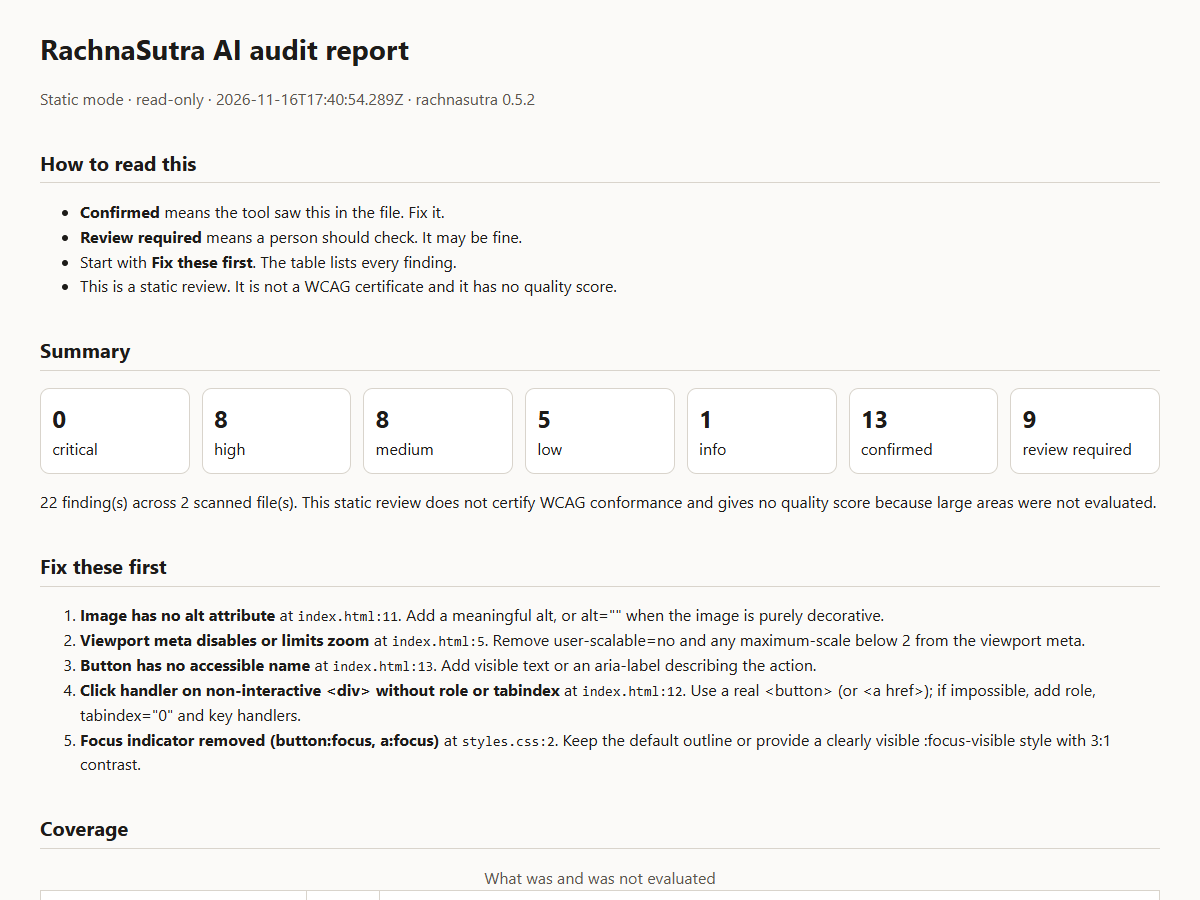
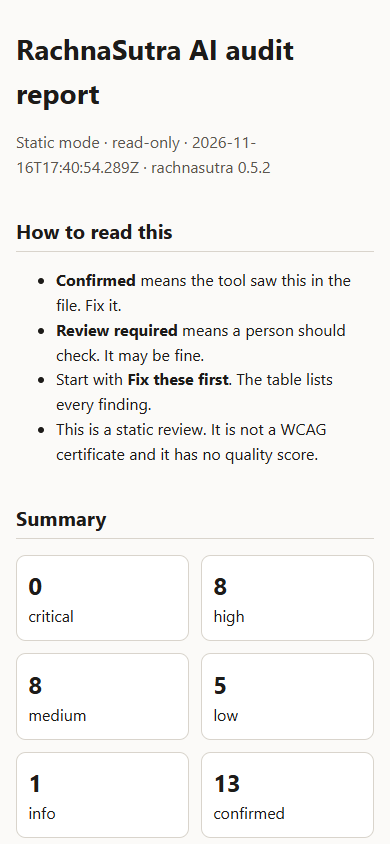
The report is built in a fixed order, so once you have read one you can read them all:

Why some findings say "confirmed" and some "review required"#

Confirmed means the tool saw the problem in the file, or measured it (for example a contrast ratio of 2.32:1). Fix those. Review required means a person should look, because something outside the file (a component wrapper, a template) might already handle it.
Step 3. Fix the top items#
The three highest-impact fixes in the sample, with the exact change:
<!-- before -->
<meta name="viewport" content="width=device-width, initial-scale=1, user-scalable=no">
<img src="hero.jpg">
<button class="icon-btn"></button>

<!-- after -->
<meta name="viewport" content="width=device-width, initial-scale=1">
<img src="hero.jpg" alt="Hero banner" width="640" height="360">
<button class="icon-btn" aria-label="Open menu"></button>
Want a ready-made ordered to-do list first? Ask for a fix plan. It changes nothing:
npx rachnasutra plan-fixes --report rachnasutra-reports/latest.jsonStep 4. Prove it worked#
Re-run against the baseline report you just saved. The tool matches findings by a fingerprint, so line-number changes do not confuse it:
npx rachnasutra verify --report rachnasutra-reports/latest.json .Baseline 22 -> current 18
Resolved: 4 Remaining: 18 Introduced: 0
resolved RS-A11Y-001 index.html:11
resolved RS-A11Y-003 index.html:5
resolved RS-A11Y-004 index.html:13
resolved RS-PERF-001 index.html:11
Static re-check only; manual accessibility and visual verification are still needed.Four fixed, nothing new broken (Introduced: 0). If a change introduces a new finding the command exits with code 4, so a script or CI job notices.

Step 5. Keep it fixed#
Add one line to your CI so a confirmed high-severity problem can never be merged again:
npx rachnasutra ci .
What to do next#
| I want to... | Go to |
|---|---|
| See realistic situations and the exact commands for each | Real-world scenarios |
| Learn every command and option | User guide |
| Understand what each rule checks and where it can be wrong | Audit rules reference |
| Let my AI IDE do the review and the edits safely | Skills and agents |
| Decide whether I can trust the results | Validation and benchmarks |
Before you share a report or claim "accessible"#
A clean report means the static rules found nothing. It does not mean the interface is accessible. Before any claim, also run these by hand: a keyboard-only pass of every key flow, a screen-reader pass, 200% zoom and 320 px width reflow, reduced-motion and high-contrast modes. The report's Limitations section lists exactly what was not tested.