
User guide

Requirements#
- Node.js 20 or newer (
node --version). - A project containing front-end source (HTML, JSX, TSX, Vue, Svelte, Astro, CSS, SCSS, LESS).
- No account, API key or internet connection is needed to run the CLI once it is installed.
Install and first run#
Run without installing:
npx github:shahvatsalofficial/rachnasutra doctor
npx github:shahvatsalofficial/rachnasutra audit .
Or clone and build:
git clone https://github.com/shahvatsalofficial/rachnasutra.git
cd rachnasutra
npm install
npm run build
node dist/cli.js audit fixtures/intentionally-broken-ui
Understand the console summary#
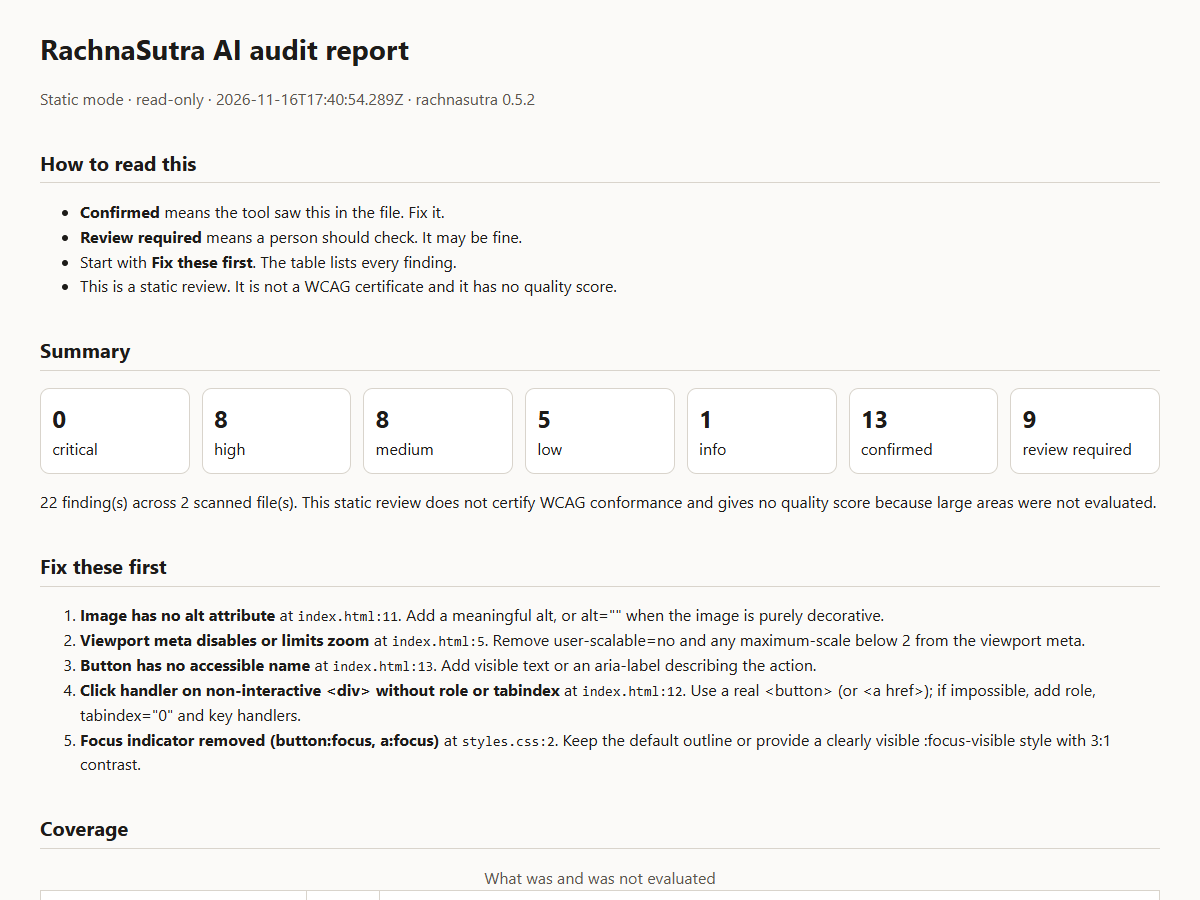
Scanned 2 file(s). 22 finding(s): 0 critical, 8 high, 8 medium, 5 low, 1 info.
  RS-0001 [high/confirmed] RS-A11Y-001 index.html:11 - Image has no alt attribute
Each line shows the ID, [severity/status], rule, location and title. The last lines remind you what was not evaluated.
Reports#
rachnasutra audit .By default this writes Markdown, HTML and JSON reports to ./rachnasutra-reports/ (latest.md, latest.html, latest.json) and prints the path to open. Open latest.html in a browser for the easiest read; it starts with a "Fix these first" list. The folder is git-ignored because reports contain code excerpts. Pre-generated examples are in samples/.
| Want | Use |
|---|---|
| Only a summary in the terminal, no files | --no-report |
| Machine-readable output on stdout | --json |
| A different folder or formats | --out <dir> --format json,md,html,sarif |
| SARIF for code scanning | rachnasutra export --format sarif . |
| A report without source text or local paths | --no-excerpts |

Reading a finding#
| Field | How to use it |
|---|---|
| Severity | Fix order: critical and high first |
| Status | confirmed can be acted on; review-required needs a quick human check |
| Evidence | The exact line and excerpt |
| Criterion | The WCAG success criterion to cite in tickets |
| Fix | A specific change to make |
| Verification | How to prove it is fixed |
| Limitations | Why it might be a false positive |
Fix and verify#

rachnasutra audit .                                    # baseline: latest.md, latest.html, latest.json
rachnasutra plan-fixes --report rachnasutra-reports/latest.json    # writes fix-plan.md and fix-plan.html; changes no source
# ... edit your code ...
rachnasutra verify --report rachnasutra-reports/latest.json .      # writes verify.md and verify.html
Open fix-plan.html to see what to change, in order, with the fix and how to check it. Open verify.html afterwards: resolved, still open, and new findings are separate. verify --report exits with code 4 if your changes introduced new findings. It re-checks only what static rules can see. Still test with a keyboard and a screen reader.
Token inventory#
rachnasutra design-system inspect .Writes rachnasutra-reports/tokens.md and tokens.html, and prints the same summary. The HTML page shows CSS custom properties, the share of colour usage that is hard-coded, and the most common colours, font sizes, spacing values and radii. Use it to plan a token system. --no-report prints the summary only.
Accessibility-only view#
rachnasutra accessibility . --jsonConfigure#
Create rachnasutra.config.json in the project root and check it:
rachnasutra config validate .| Key | Effect |
|---|---|
exclude | Paths or prefixes to skip |
disableRules | Rule IDs to turn off |
failOn | Default threshold for audit and ci when --fail-on is not passed |
maxFiles | File cap |
imageBudgetKb | Size above which an image is flagged |
Install the skills in your AI IDE#
Preview first, then install:
rachnasutra skills install --host claude --target . --dry-run
rachnasutra skills install --host claude --target .| Host ID | Installs to |
|---|---|
claude | .claude/skills/ |
cursor | .cursor/skills/ |
codex | .agents/skills/ and a block in AGENTS.md |
copilot | .github/skills/ |
gemini | .gemini/skills/ (experimental) |
Then ask your assistant, for example:
Use rachnasutra-prime to review this project's UI and suggest the most valuable accessible and responsive improvements with source evidence.
If you edit an installed skill, reinstalling reports a conflict instead of overwriting. Use --force to overwrite; a backup is kept in .rachnasutra/backup/. Remove with:
rachnasutra skills uninstall --host claude --target .Files you modified are left in place.
Use in CI#
rachnasutra ci .                      # fails on confirmed high or critical findings
rachnasutra audit . --fail-on medium  # fails on any finding at or above medium
rachnasutra export --format sarif . > rachnasutra.sarif
See Deployment and CI for a full workflow.
What a clean result means#
A report with zero findings means the static rules found nothing. It does not mean the interface is accessible, usable or well designed. Complete these manual checks before making any claim:
- Keyboard-only walkthrough of every key flow.
- Screen reader pass (NVDA or JAWS on Windows, VoiceOver on macOS and iOS, TalkBack on Android).
- 200% zoom and 320 px width reflow.
- Reduced-motion and high-contrast modes.
- Real devices and real content.
The WCAG checklist is in skills/rachnasutra-access/references/wcag-22-aa-checklist.md.
Troubleshooting#
| Symptom | Cause and fix |
|---|---|
Scanned 0 file(s) | The path has no supported files, or they are in an ignored folder. Check the path and exclude |
truncated is true | A limit was hit. Narrow the path or raise maxFiles. A gate exits 5 |
gate not passed (exit 5) | The scan was partial or empty. Check the path; use --allow-empty only when no UI files is expected |
Many RS-A11Y-005 hits in a component library project | Labels are supplied by wrappers. Treat as review-required |
Blocked: N conflicting file(s) | You edited installed skills. Use --dry-run to inspect, --force to overwrite |
| Exit code 3 | Browser mode could not start: Playwright, a browser or index.html is missing |
| Exit code 2 | Unknown flag, bad value, missing folder, or invalid config |
npx github:... fails | The repository may be private or Node is below 20 |
Getting help#
Open an issue at https://github.com/shahvatsalofficial/rachnasutra/issues. Include the command, Node version, operating system and a minimal snippet. Do not post secrets or private code.